Documentation Index
Fetch the complete documentation index at: https://domoinc-arun-raj-connectors-domo-479583-raisers-edge-connec.mintlify.app/llms.txt
Use this file to discover all available pages before exploring further.
Intro
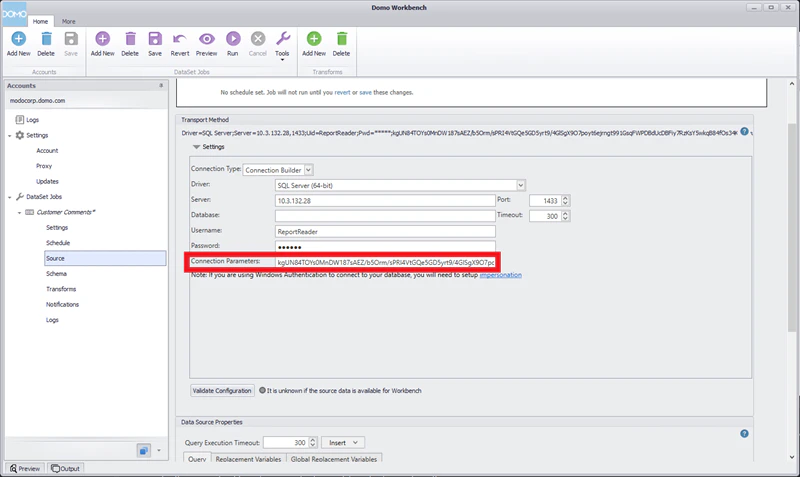
If you experience any problems during or following your migration from Workbench 4 to Workbench 5, you can uninstall Workbench 5 and reinstall Workbench 4. Most of the time, you will not experience any problems moving back to Workbench 4. However, if you have added connection parameters to an ODBC job, you will need to reset those connection parameters in Workbench 4 before those jobs will begin working again. In this article, we explain how to uninstall Workbench 5 and reinstall Workbench 4, then reset the connection parameters in your ODBC job.Checking Your Connection Parameters
Before uninstalling Workbench 5, you should check and record the connection parameters in each ODBC job before moving back to Workbench 4. If you do not have any connection parameters, simply uninstall Workbench 5 and reinstall Workbench 4. If you are not sure, you will need to check each of your ODBC jobs for connection parameters and record those prior to uninstalling Workbench 5. To check the connection parameters in your ODBC jobs…-
Navigate to the configure tab of the job and select
Edit under Source.
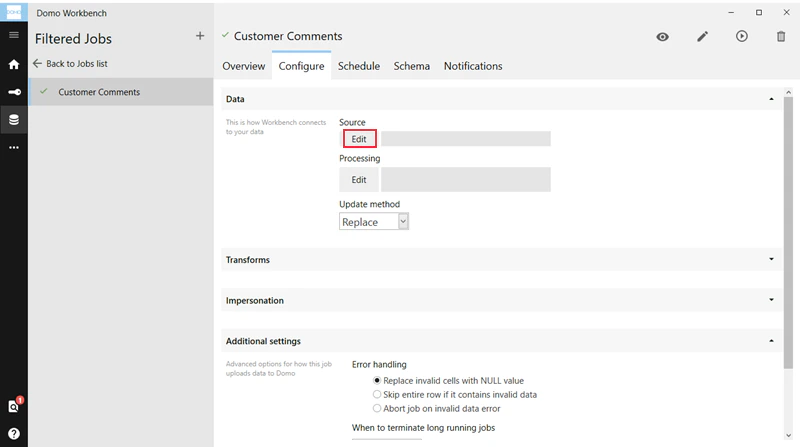
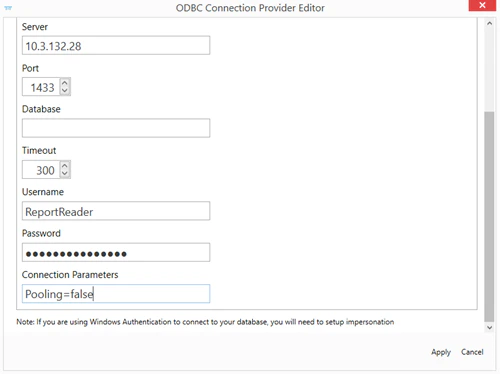
- Make a note of any parameters entered into the Connection Parameters field. In the following example, the connection parameters read “Pooling=false.”
Uninstalling Workbench 5
After you have written down the connection parameters for your ODBC jobs, you can uninstall Workbench 5. To uninstall Workbench 5…-
Go to
Control Panel > Programs and Features and select Domo Workbench.
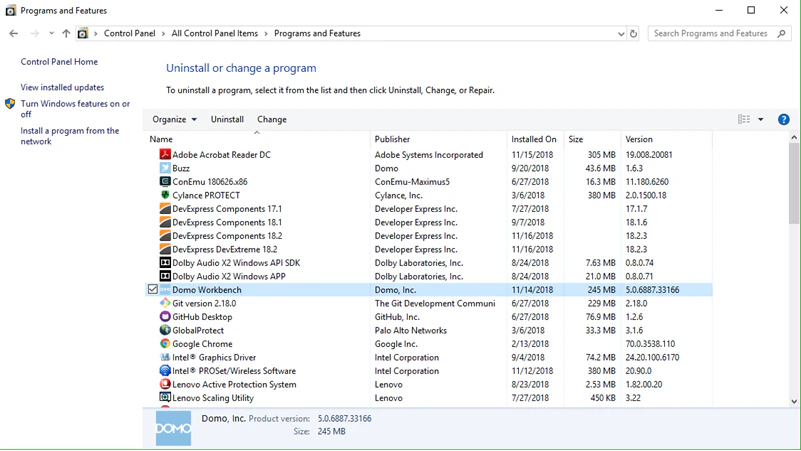
- In the pop-up window, choose Uninstall.
Reinstalling Workbench 4
Once you have uninstalled Workbench 5, follow these instructions to reinstall Workbench 4. To reinstall Workbench 4,- Navigate to the Data Center in Domo.
- Click On-Premise in the toolbar at the top of the screen.
- Select the Install Workbench 4 option in the bottom right.