

You can edit a DataFusion in the Data Center. You can only edit a DataFusion if you are the owner OR have an Admin default security role OR a custom role with the Manage DataSet grant enabled. Learn more about Managing Custom Roles. Follow these steps to edit a DataFusion:Documentation Index
Fetch the complete documentation index at: https://domoinc-arun-raj-connectors-domo-479583-raisers-edge-connec.mintlify.app/llms.txt
Use this file to discover all available pages before exploring further.
-
From inside the Data Center, select
 DataSets in the left navigation.
- Find the DataFusion you want to edit.
-
Select the DataFusion to open the Details view and select
 down arrow > Edit DataFusion.
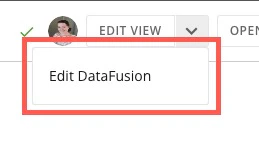
- Update the DataFusion.
Tip: You can rename a DataFusion by selecting  action menu > Edit Name & Description. Change the title or description of the DataFusion and select Save.
action menu > Edit Name & Description. Change the title or description of the DataFusion and select Save.